КАТЕГОРИИ:
Архитектура-(3434)Астрономия-(809)Биология-(7483)Биотехнологии-(1457)Военное дело-(14632)Высокие технологии-(1363)География-(913)Геология-(1438)Государство-(451)Демография-(1065)Дом-(47672)Журналистика и СМИ-(912)Изобретательство-(14524)Иностранные языки-(4268)Информатика-(17799)Искусство-(1338)История-(13644)Компьютеры-(11121)Косметика-(55)Кулинария-(373)Культура-(8427)Лингвистика-(374)Литература-(1642)Маркетинг-(23702)Математика-(16968)Машиностроение-(1700)Медицина-(12668)Менеджмент-(24684)Механика-(15423)Науковедение-(506)Образование-(11852)Охрана труда-(3308)Педагогика-(5571)Полиграфия-(1312)Политика-(7869)Право-(5454)Приборостроение-(1369)Программирование-(2801)Производство-(97182)Промышленность-(8706)Психология-(18388)Религия-(3217)Связь-(10668)Сельское хозяйство-(299)Социология-(6455)Спорт-(42831)Строительство-(4793)Торговля-(5050)Транспорт-(2929)Туризм-(1568)Физика-(3942)Философия-(17015)Финансы-(26596)Химия-(22929)Экология-(12095)Экономика-(9961)Электроника-(8441)Электротехника-(4623)Энергетика-(12629)Юриспруденция-(1492)Ядерная техника-(1748)
Key information section 2. Application software is any tool that functio
|
|
|
|
| 
|

|
Application software is any tool that functions and is operated by means of a computer, with the purpose of supporting or improving the software user's work. In other words, it is the subclass of computer software that employs the capabilities of a computer directly and thoroughly to a task that the user wishes to perform. This should be contrasted with system software (infrastructure) or middleware (computer services/ processes integrators), which is involved in integrating a computer's various capabilities, but typically does not directly apply them in the performance of tasks that benefit the user. In this context the term application refers to both the application software and its implementation. Typical examples of software applications are word processors, spreadsheets, media players and database applications.
 A word processor enables you to create a document, store it electronically on a disk, display it on a screen, modify it by entering commands and characters from the keyboard, and print it on a printer. The great advantage of word processing over using a typewriter is that you can make changes without retyping the entire document. If you make a typing mistake, you simply back up the cursor and correct your mistake. If you want to delete a paragraph, you simply remove it, without leaving a trace. It is equally easy to insert a word, sentence or paragraph in the middle of a document. Word processors usually support these features (and a few others).
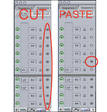 Cut and paste: Allows you to remove (cut) a section of text and insert (paste) it somewhere else.
Find and replace: Allows you to direct the word processor to search for a particular word or phrase. You can also direct the word processor to replace one group of characters with another everywhere that the first group appears.
Word wrap: The word processor automatically moves to the next line when you have filled one line with text, and it will readjust text if you change the margins.
Print: Allows you to send a document to a printer to get hard copy.
Font specifications: Allows you to change fonts within a document. For example, you can specify bold, italics, and underlining. Most word processors also let you change the font size and the typeface.
 Graphics: Allows you to include illustrations and graphs in a document. Some programs let you create the illustrations within the word processor; others let you insert a picture from a different
program.
Headers, footers and page numbering: Allows you to specify customized headers and footers that the word processor will put at the top and bottom of even page. The word processor automatically keeps track of page numbers so that the correct number appears on each page.
Layout: Allows you to specify different margins within a single document and to specify various methods for indenting paragraphs - how much space you leave between the margins and the paragraphs.
Merge: Allows you to merge text from one file into another file. This is particularly useful for
generating many files that have the same format but different data. Generating mailing labels is the classic example of using merges.
 Spell checker: A utility that allows you to check the spelling of words. It will highlight any words that it does not recognize.
Thesaurus: Allows you to search for synonyms without leaving the word processor.
The line dividing word processors from desktop publishing systems is constantly shifting. In general, though, DTP applications support finer control over layout and more support for full-colour documents.
A spreadsheet program helps you manage personal and business finances. Spreadsheets, or worksheets, are mathematical tables which show figures in rows and columns.
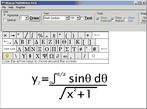 A cell can hold three types of data: text, numbers and formulae. Formulae are entries that have an equation which calculates the value to display; we can use them to calculate totals, percentages, discounts, etc.
Spreadsheets have many built-in functions, prewritten instructions that can be carried out by referring to the function by name. For example, = SUM (D2:D7)means add up all the values in the cell range D2 to D7.
The format menu lets you choose font, alignment, borders, etc.
A database is essentially a computerized record-keeping system.
Each unit of information you create is called a record and each record is made up of a collection of fields. Typically, a single record consists of a set of field names like: Title, First Name, Surname, Job Title, TelNo and ID. You fill in a form with the relevant information for each field to add a new record to the database. There are different data types.
| Text - holds letters and numbers not used in calculations Number - can only hold numbers used in calculations and reports Memo - can store long texts Date/Time - a date or time or combination of both AutoNumber - assigns a number to each record OLE Object - (object linking and embedding) holds sounds and pictures | 
|
Yes/No - for alternative values like true/false, yes/no, on/off, etc.
Hyperlink - adds a link to a website
Once you have added data to a set of records, indexes must be created to help the database find specific records and sort (classify) records faster. An index performs the same function as in the back of a book or in a library. For example, if you regularly search your database by surname, the index should be defined on this field.
Two database tables can be related or joined as long as they hold a piece of data in common. A file of employee names, for example, could include a field called 'DEPARTMENT NUMBER' and another file, containing details of the department itself, could include the same field. This common field can then be used to link the two files together.
Extracting information from a database is known as performing a query. For example, if you want to know all customers that spend more than £9,000 per month, the program will search the name field and the money field simultaneously.
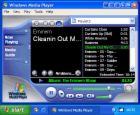 Media player is a term typically used to describe computer software for playing back multimedia files. Most software media players support an array of media formats, including both audio and video files.
|
|
|
|
|
Дата добавления: 2014-12-27; Просмотров: 914; Нарушение авторских прав?; Мы поможем в написании вашей работы!